Why is my electric golf cart clicking but not moving? That sharp click usually means the control circuit is responding, but power is not reaching the motor. The sound may come from a solenoid, contactor, relay, or battery connection. A quiet motor can hide a serious voltage drop.
Industry data supports a careful diagnosis. The U.S. Department of Energy’s Alternative Fuels Data Center highlights battery condition, charging systems, and electrical connections as critical factors in electric vehicle performance. The Battery Council International also reports that lead-acid batteries remain widely used in low-speed electric vehicles, including many golf carts. Their condition changes with age, heat, charging habits, and maintenance. A battery can show acceptable voltage at rest, then collapse under load.
This guide presents seven practical checks, from battery testing to solenoid inspection, motor wiring, and mechanical resistance. Use an insulated meter, eye protection, and the manufacturer’s service information. Do not trust the clicking sound alone. It is only a clue.
Start with the basics.
A loose cable may look clean from above while corrosion hides beneath its terminal. A worn solenoid may click repeatedly but fail to transfer current. A seized brake, damaged motor cable, or weak controller can create similar symptoms. I have seen owners replace expensive controllers before testing the batteries under load. That approach wastes money and time. The better method is slower, measurable, and safer. These tips will help separate a simple connection fault from a deeper electrical or mechanical failure.
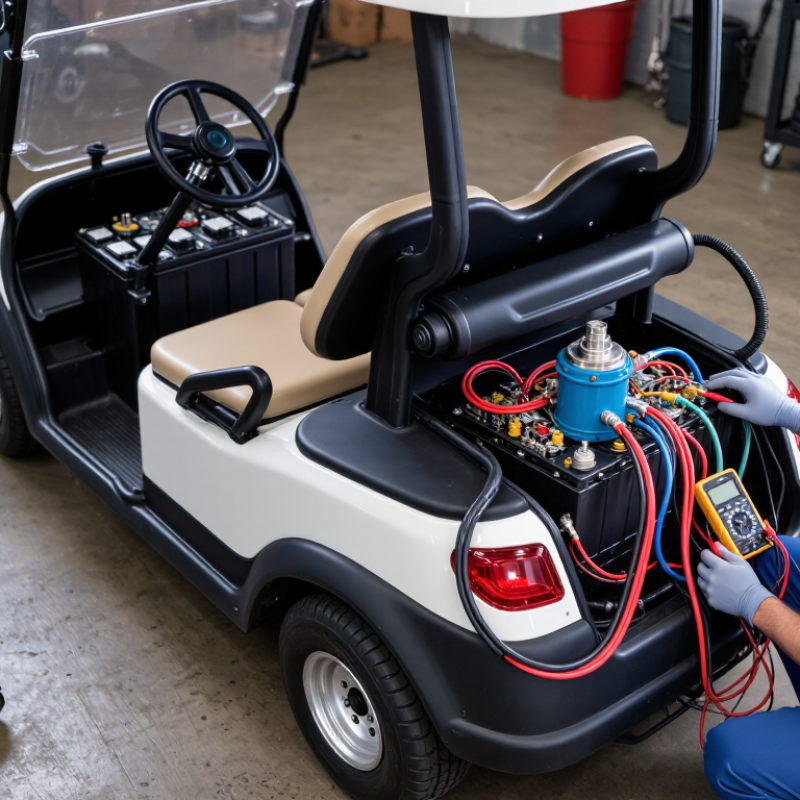
An electric golf cart that clicks but refuses to move is communicating through its control system. The click usually comes from the solenoid, an electrical switch that should send battery power toward the motor. A sharp click suggests the command arrives, but it does not prove that enough current is passing through.
Check the battery voltage while pressing the accelerator, not only when the cart is parked. Weak batteries can show normal voltage at rest and collapse under load. Inspect loose terminals, white corrosion, damaged cables, and a hot connector. Listen for one click or repeated clicking. Repeated clicks often indicate unstable voltage. It is easy to blame the motor too soon.
Test the forward-reverse switch, accelerator sensor, brake interlock, and solenoid connections. A faulty safety switch may prevent movement while leaving the click unchanged. If the solenoid clicks firmly, inspect the controller and motor for burnt smells, cracked wiring, or unusual heat. Disconnect the charger before testing, secure the cart, and keep the drive wheels raised during electrical checks. Experience shows that rushed testing creates misleading results. I have also seen a clean-looking terminal hide corrosion beneath its surface. A qualified technician should measure voltage drop through each cable, because visual inspection alone can miss the real fault.
When an electric golf cart clicks but will not move, the solenoid may be receiving power. The battery pack may still fail under load. Battery Council International reports that over 99% of lead batteries are recycled in the United States. Recycling data does not prove battery health. Tip one: Turn the key off, unplug the charger, and wear eye protection. Tip two: Inspect every terminal for white corrosion, heat marks, cracks, or loose cables.
Tip three: Measure the full pack with a digital multimeter. Then test each battery separately. A healthy-looking voltage can collapse when current flows. A load tester gives better evidence than a resting reading. Tip four: Check the main positive cable from the pack to the controller. Check the main negative cable too. Tighten connections only to the service manual’s torque specification. Over-tightening can damage posts.
Tip five: Follow the heavy cables, not only the small control wires. Look for melted insulation or a warm connector after a brief test. Tip six: On flooded batteries, check fluid levels and use only distilled water. Never add water before charging. Tip seven: Inspect the main fuse, disconnect, and ground path. A click is not proof of a complete power circuit. I sometimes expect the pack to be the culprit too quickly; one loose negative connection can imitate a dead battery. Stop testing if a cable sparks, swells, or becomes hot.
| Tip | What to Check | Normal Finding | Possible Problem | Recommended Action |
|---|---|---|---|---|
| 1. Confirm the clicking source | Turn the key on and press the accelerator while keeping the cart in a safe, secured position. Listen for a single click or repeated clicking. | A single click commonly indicates that the solenoid is attempting to close. | Repeated clicking often indicates low battery voltage, a weak connection, or insufficient current reaching the solenoid. | Do not assume the solenoid is defective until the battery pack and high-current cables have been tested. |
| 2. Measure the complete battery pack | With the charger disconnected and the cart switched off, measure across the pack’s positive and negative terminals using a DC voltmeter. | A fully charged lead-acid pack is usually close to its nominal voltage: about 38–39 V for a 36 V system or 50–51 V for a 48 V system at rest. | A substantially lower reading may indicate a discharged pack, a failed charger, poor connections, or a weak battery. | Charge the pack with the correct charger, then allow it to rest before testing again. Replace or professionally test batteries that remain low. |
| 3. Test each battery individually | Measure every battery separately after charging. Common battery configurations use 6 V, 8 V, or 12 V units. | At rest, a fully charged lead-acid battery is approximately 6.3 V, 8.4 V, or 12.7 V, depending on its nominal rating. | One battery that is notably lower than the others can limit pack current and cause clicking without movement. | Clean and tighten the affected terminals, check electrolyte level where applicable, and have the battery load-tested before replacement. |
| 4. Inspect the main battery connections | Inspect all battery posts, cable lugs, jumpers, and the main positive and negative cables for corrosion, looseness, heat damage, or cracked insulation. | Connections should be clean, tight, dry, and free of visible corrosion or discoloration. | A high-resistance connection can show normal voltage with no load but fail when the motor demands high current. | Disconnect power safely, clean suitable terminals, tighten fasteners to the vehicle manufacturer’s specification, and replace damaged cables. |
| 5. Perform a voltage-drop test | Place the meter probes across each cable end or connection while pressing the accelerator briefly with the drive wheels safely lifted. | A good high-current cable or connection should have very little voltage drop under load. | A noticeable drop across one cable, terminal, or connection points to excessive resistance. | Repair or replace the connection or cable showing the greatest voltage drop. Avoid testing with the wheels on the ground. |
| 6. Check the solenoid and control wiring | Inspect the solenoid terminals, small control wires, key switch circuit, accelerator microswitch, and any safety interlock connections. | The solenoid should click once and maintain contact when the accelerator is pressed. | A loose control wire, failed microswitch, worn solenoid contacts, or low control voltage can produce a click without delivering motor power. | Test according to the vehicle service manual. Replace the solenoid only after confirming that the control signal and battery supply are correct. |
| 7. Check motor, controller, and mechanical load | If the pack and connections pass inspection, check motor cables, controller terminals, motor condition, brakes, differential, and whether the wheels rotate freely. | The motor should receive pack voltage through the controller and the drivetrain should turn without binding. | A failed controller, open motor circuit, seized brake, damaged motor, or locked drivetrain can prevent movement after the click. | Use the correct wiring diagram and service specifications for advanced tests. Stop if cables become hot, batteries vent, or burning odors appear. |
An electric golf cart that clicks but will not move usually has a control signal, but not enough motor power. Begin with a fully charged battery pack and place the direction selector in neutral. Set the parking brake. Wear eye protection. A click is useful evidence, not a diagnosis.
Test the solenoid with a digital multimeter. With the pedal released, check the small control terminals for voltage when the pedal is pressed. The reading should match the cart’s control voltage. Then measure the large terminals while pressing the pedal. A healthy solenoid should show very little voltage loss across its terminals. A strong reading there suggests worn contacts. Do not bridge the terminals with a tool. That shortcut can create dangerous sparks.
Inspect both large cables for loose lugs, green corrosion, swollen insulation, or heat marks. Measure voltage at the battery side and motor side while the cart tries to move. A noticeable drop points toward a cable or connection problem. Test the key switch, forward-reverse switch, pedal switch, and seat or brake safety switches for continuity. Each should change state smoothly when operated. Some switches look fine but fail under vibration. I have seen clean terminals hide a weak crimp. Recheck every connection after testing, and stop if wiring becomes hot or readings remain confusing.
An electric golf cart that clicks but will not move usually has power reaching the control circuit, not the drive motor. Begin with the battery pack. Measure voltage at rest, then press the accelerator while monitoring voltage. A sharp voltage drop suggests weak batteries, loose terminals, or damaged cables. Inspect every connection for heat marks, corrosion, or a loose crimp. Wear eye protection and keep the wheels safely off the ground during testing.
Listen to the solenoid or contactor. One click may mean the coil activates, but the main contacts may still be burned or stuck open. Check input and output voltage with a suitable meter. Next, inspect the controller for loose plugs, moisture, and melted wires. Do not bypass safety switches. They protect the operator and the system. I once blamed the controller too quickly; a corroded ground strap caused the same symptom.
Test the motor terminals only with the manufacturer’s service procedure and a fully isolated power system. Look for damaged brushes, unusual resistance, or a burnt smell. Then inspect the drive system: parking brake release, direction selector, axle, belt, gears, and rear wheels. A seized bearing can stop movement while the motor clicks normally. Turn the wheels by hand when power is disconnected. If readings conflict, record them before replacing parts. Guessing becomes expensive. A qualified technician should handle high-current repairs when test results remain unclear.
When an electric golf cart clicks but will not move, the clicking often comes from the solenoid. It may receive power without sending enough current to the motor. Begin with simple checks: charge the battery pack fully, inspect the battery terminals, and clean visible corrosion with proper safety equipment. Check loose cables too. A weak battery can sound convincing. It can still be the problem.
You can repair the cart yourself when the issue involves cleaning terminals, tightening connections, or replacing a clearly damaged fuse. Use an insulated tool, switch off the cart, and follow the service manual. Test the forward and reverse switch carefully. Listen for one firm click or repeated clicking. Repeated clicks may indicate low voltage, a failing solenoid, or a poor connection. I once focused too quickly on the motor and overlooked a loose cable. That mistake wasted time.
Call a qualified technician when battery readings differ sharply, cables become hot, or the motor remains silent after basic tests. Professional help is also safer for controller faults, internal motor damage, and complex wiring. Do not bypass safety switches or bridge terminals to force movement. That shortcut can damage components or cause burns. Stop immediately if you smell melted insulation, see sparks, or find swollen batteries. A written voltage reading and a clear description of the clicking will help the technician diagnose the cart faster.
The solenoid receives a command, but sufficient current may not reach the motor. A click is not proof. Weak batteries, damaged cables, or internal switch faults can still block movement.
Repeated clicking often suggests unstable voltage under load. Check battery voltage while pressing the accelerator. A resting reading may look normal, then collapse during operation.
Look for white corrosion, loose terminals, cracked cases, heat marks, and swollen batteries. Test the complete battery pack and each battery separately. A load test usually provides stronger evidence than a resting measurement.
Follow the thick positive and negative cables toward the controller and motor. Check for melted insulation, warm connectors, or damaged cable ends. Tighten connections only to the service manual’s specified torque.
Inspect the forward-reverse switch, accelerator sensor, brake interlock, and solenoid connections. A faulty safety switch may leave the clicking sound unchanged. The motor is not always the culprit.
Turn the key off and disconnect the charger first. Wear eye protection and use insulated tools. Secure the cart, and raise the drive wheels during electrical checks.
You may handle visible corrosion, loose connections, or a clearly damaged fuse. Follow the service manual carefully. Stop if cables spark, become hot, or smell like melted insulation.
Seek professional help when readings differ sharply, the motor stays silent, or wiring appears complex. Controller faults and internal motor damage require careful measurements. Do not bypass safety switches or bridge terminals. That shortcut can cause burns.
Record the battery voltage at rest and during acceleration. Describe whether the cart makes one click or repeated clicks. Mention hot connectors, unusual smells, corrosion, or visible cable damage. I once blamed the motor too quickly. A loose cable caused the real problem.
Why is my electric golf cart clicking but not moving? The clicking sound usually indicates that the control system is receiving power, but another part of the drive system is not completing the connection. Begin by checking the battery pack, terminals, cables, and main power connections for low voltage, corrosion, loose hardware, or damaged wiring. A weak battery pack can allow a click without providing enough energy to move the cart.
Next, test the solenoid, safety switches, and related cables, then inspect the motor, controller, and drive components for signs of overheating, wear, or mechanical blockage. Confirm that the accelerator and direction controls operate correctly and that the brakes are not preventing movement. Some basic inspections may be suitable for a careful owner, but electrical testing should be performed with proper safety precautions. If the issue continues or the fault involves the controller, motor, or internal wiring, contacting a qualified technician can help prevent further damage and ensure the cart is repaired safely.

Tulip Cart